Registering a CGI user account
1. Navigate to https://www.scottishjuniorgolf.org/

2. Click "MENU"

3. Click "Register"

4. Click "REGISTER AS A CGI"

5. Once you have reviewed the terms & conditions

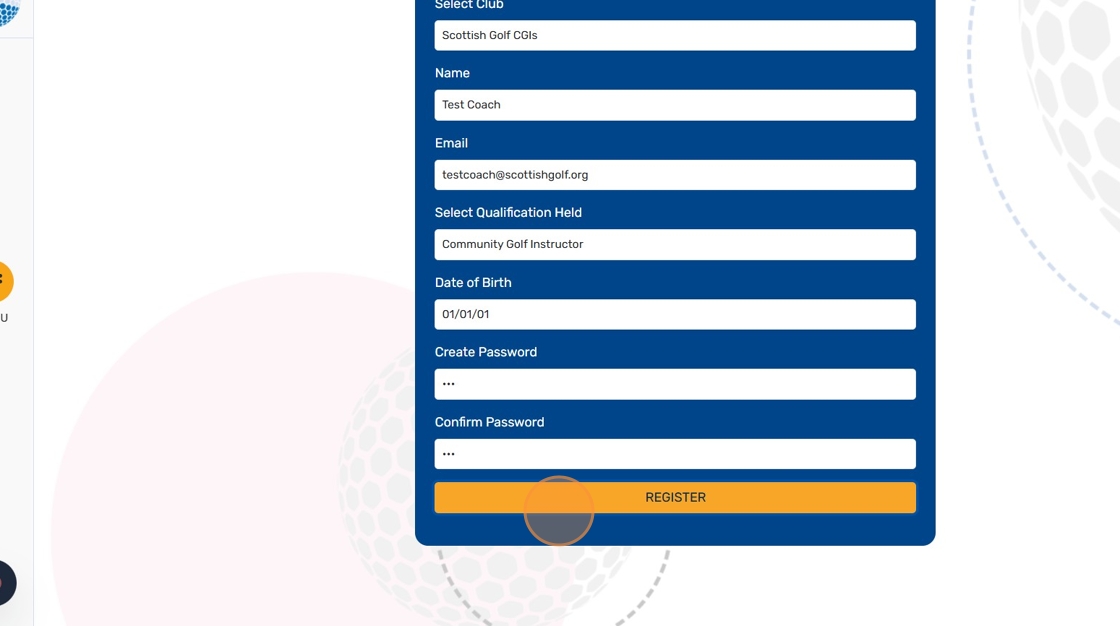
6. If you are a CGI not affiliated with a Golf Club, select "Scottish Golf CGIs". Otherwise, select your home club

7. Select the "Community Golf Instructor" option.

8. Click "REGISTER"
9. Click "Finish"

10. Your registration has been sent to Scottish Golf or your clubs main account holder. You will receive notification once your access has been approved.
Related Articles
CGI Accessing Instructor Resources on Scottish Junior Golf Website
1. Navigate to https://www.scottishjuniorgolf.org/ 2. Click here. 3. Click "Login" 4. Click Coach & CGI Login 5. Enter your email & password and click login 6. Click "VISIT RESOURCE CENTRE" 7. Click the eye icon to quick-view any resource booklet 8. ...How To Access Saved Sessions On Scottish Golf
1. Navigate to https://www.scottishjuniorgolf.org/ 2. Click here. 3. Click "Login" 4. Click here. 5. Enter email & password and click login 6. Click "VIEW SAVED SESSIONS" or "SAVED SESSIONS" on left toolbar 7. Click "My Sessions" for sessions only ...Junior Skills Challenge - results bulk upload via csv.
1. Navigate to https://www.scottishjuniorgolf.org/ 2. Click "MENU" 3. Click "Login" 4. Click "CLUB LOGIN" 5. Enter your club account email and password credentials and click "LOGIN" 6. Click "Skills Challenge" 7. Click "Manage Players & Upload ...Get into Golf Planning Your Programme
Like any business, a well-structured plan with objectives, clear actions, timelines and accountability is vital to the success of your club’s Get into Golf programme. Using insights from other clubs, the following document provides advice and ...